 Darb
DarbDarb Fuel Card
A card that only works for fuel.
Powerful controls that replace cash and traditional fuel chips.
A better starting point
Cash. Fuel chips.One Fuel Card.
No more cash handed to drivers. No more card tied to one selected fuel network.
Freedom to fuel
The next station is the right station.
Use the Darb Fuel Card at all fuel stations across Saudi Arabia, not just one selected network.
A clearer number
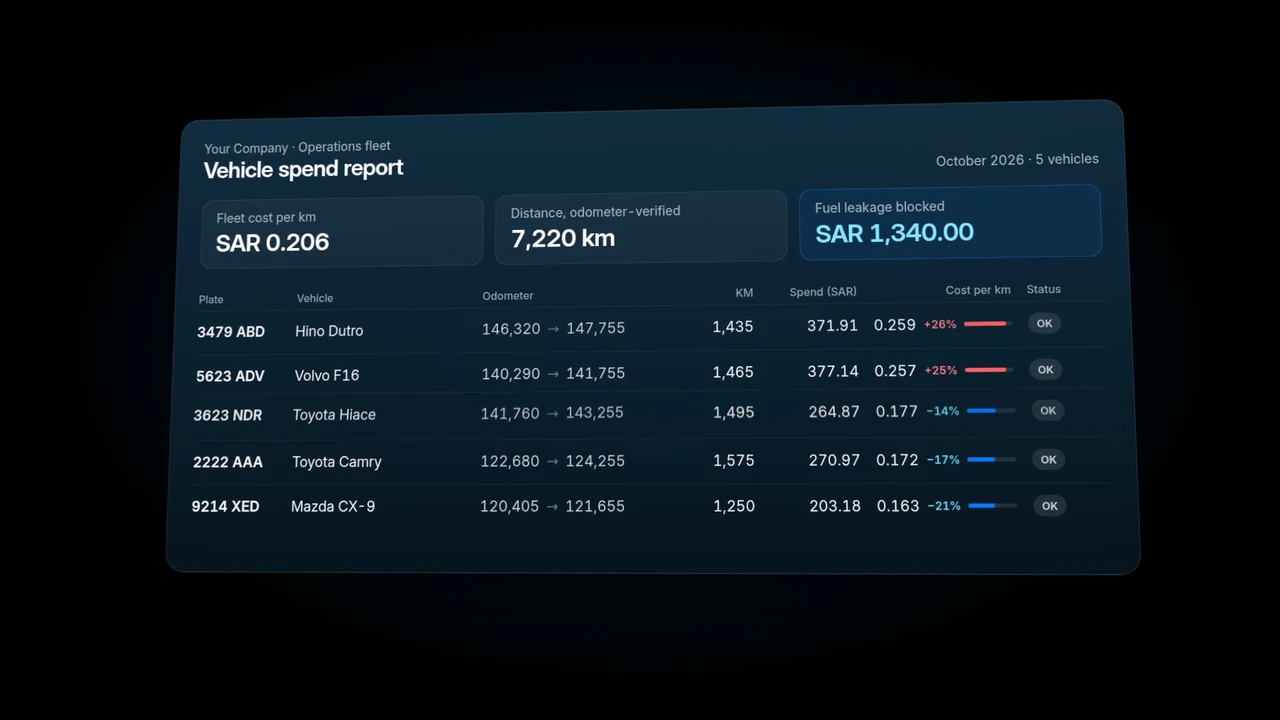
Know the cost of every kilometre.
Track odometer readings alongside fuel spend to see cost per kilometre. Give your finance team a useful measure, not a pile of fuel receipts.
Example calculation: fuel spend ÷ distance travelled.
A focused default
Want to use it beyond fuel? Enable it with one click.
The Fuel Card is restricted to fuel-station merchant categories by default. Your business can optionally enable other merchant category codes (MCCs).
MERCHANT CATEGORIES
Reduce fuel fraud by 10%.
Keep fuel spend in view with odometer readings, cost per kilometre and a fuel-station-only default.
Darb Fuel Card
Put fuel spend on the card.
Leave driver cash and restrictive fuel chips behind.