 Darb
DarbTraffic Violation Monitoring
View and manage traffic violations linked to drivers and vehicles.
The Compliance section lets you monitor traffic violations linked to drivers and vehicles, track fines, manage payments, and ensure compliance.
Access Traffic Violations
- Go to Compliance.
- Select Traffic Violations.
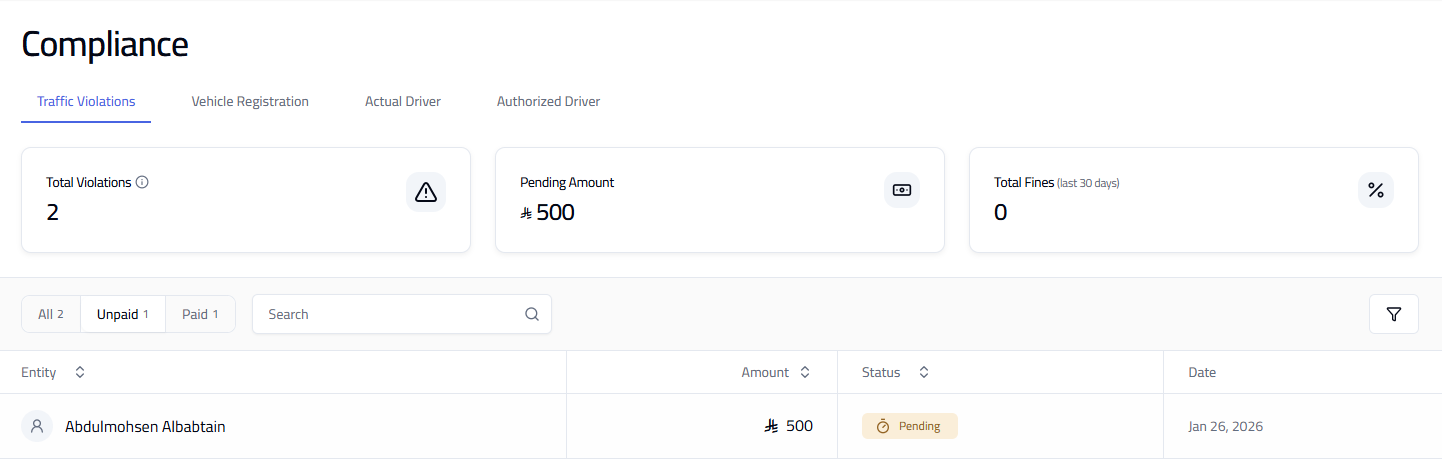
What You Can See
- Total Violations — total recorded violations.
- Pending Amount — total unpaid fines.
- Total Fines (Last 30 Days) — overview of recent fines.
Each violation shows the entity (driver or vehicle), amount, status (Pending or Paid), and date.
Filter Violations
- All — view every violation.
- Unpaid — view pending fines.
- Paid — view settled fines.
Tip: Regularly monitor pending violations to avoid accumulation of fines. Unpaid violations may impact fleet operations or compliance status.