Darb
DarbManaging Groups & Budgets in Darb
Organize teams, manage shared budgets, and control access for departments, branches, or projects.
The Groups feature in Darb allows businesses to organize teams, manage shared budgets, and control access for operational units such as departments, branches, or projects.
Examples: Operations Team, Sales Department, Fleet Operations, Marketing Team.
Accessing the Groups Section
Navigate to Groups from the dashboard. You'll see two tabs: Groups and Group Managers.
Groups Dashboard
Inside the Groups tab you can view all created groups along with: Group Name, Owner, Assets, Vehicles, Drivers, Credit Cards, Current Budget, Budget Reset Frequency, and Status.

Filter & Search
- Active — currently active groups.
- Terminated — inactive or terminated groups.
- Use the search bar to quickly find a group by name.

Create a New Group
- Click Create New Group at the top-right of the screen.
- Enter a Group Name (e.g., Riyadh Operations, Sales Team).
- Add a short Description.
- Select the Group Owner — the manager overseeing the group.
- Optionally set a Budget Amount in SAR and Frequency (Weekly, Monthly, Quarterly, or Custom).
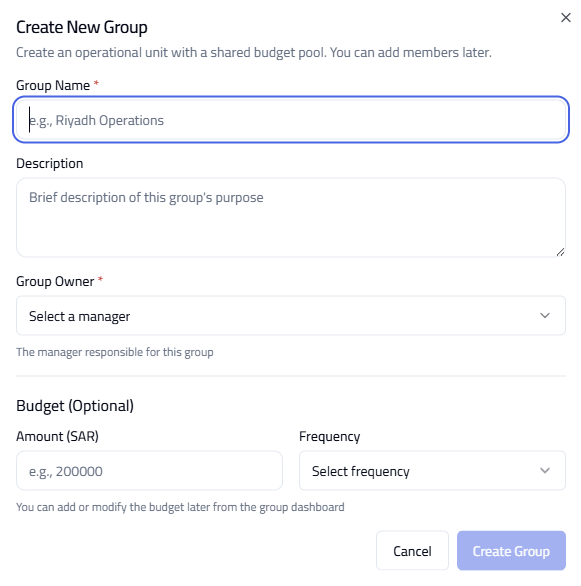
Note: Budgets can also be updated later from the group dashboard.
Managing Group Managers
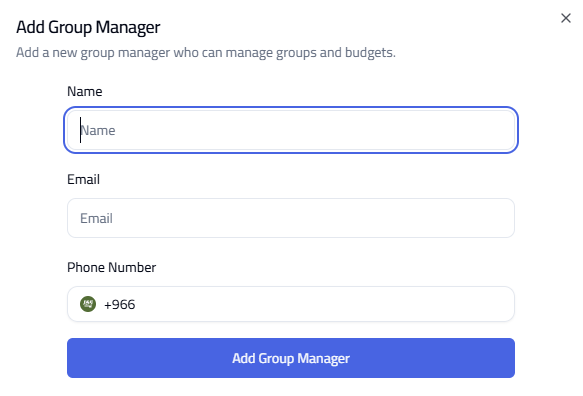
Group Managers oversee groups and budgets. Navigate to the Group Managers tab to view Name, Phone Number, and Email Address.

- Click Add Group Manager at the top-right.
- Enter Full Name, Email Address, and Phone Number.
- Click Add Group Manager.