 Darb
DarbHow to Make a Fuel Transaction
Step-by-step guide for drivers to unlock a Darb fuel card, capture the odometer, and complete a fuel payment.
Darb Fuel Cards are designed to make fuel payments secure and easy. Before completing a transaction, the driver must complete the following steps.
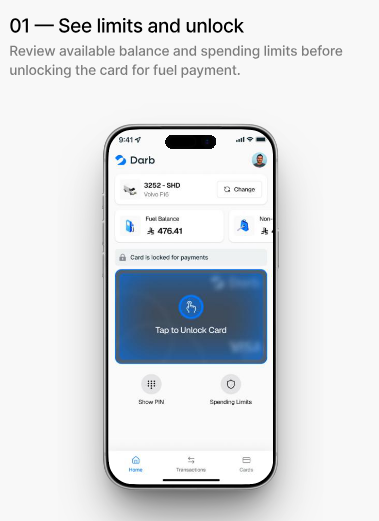
Step 1: Review the Card and Unlock It
Open the Darb mobile app and review:
- Your available spending limit
- Card information
- Remaining balance
When you are ready to make a purchase, tap Unlock Card.
Note: The card must be unlocked before making a fuel transaction.
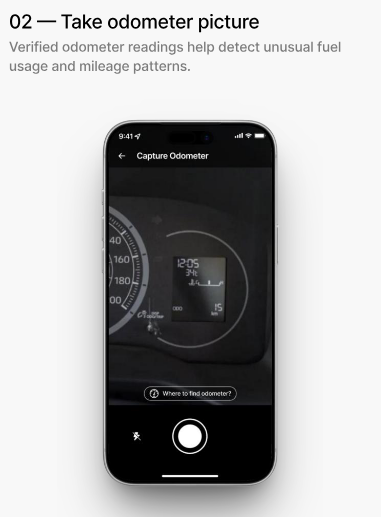
Step 2: Capture the Odometer Reading
After unlocking the card, you will be asked to take a photo of the vehicle's odometer.
This helps:
- Verify the vehicle mileage
- Detect unusual fuel usage
- Improve fleet monitoring and fraud prevention
Make sure the odometer reading is clear and visible before submitting the photo.
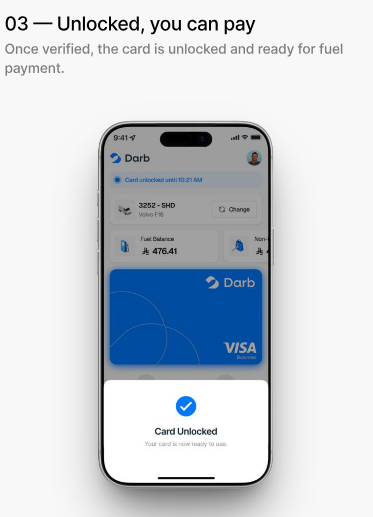
Step 3: Complete the Payment
Once the odometer photo is accepted, your card will be unlocked and ready to use.
You can now:
- Pay for fuel at the station
- Complete your transaction normally
After the payment is completed, the card will return to its normal secure state.
Important Notes
- Always unlock the card before making a fuel purchase.
- Ensure the odometer photo is clear and accurate.
- If your company policy requires additional verification, follow the instructions shown in the app.
- If you experience any issues, contact your company administrator or Darb Support.