 Darb
DarbHow to Require Receipts on a Card
Require receipts for Travel & Expense card transactions and automatically freeze the card when receipts are overdue.
Receipt Submission & Card Freeze lets you require a receipt for every transaction on a Travel & Expense card. If a cardholder doesn't upload one in time, the card automatically freezes — it unfreezes once the missing receipts are submitted, or an admin can unfreeze it manually.
Turning It On
There are two ways to turn this on for a card.
- While creating a new card — when you create a new Travel & Expense card, you'll reach a step with a Receipt Submission & Card Freeze toggle. Turn it on before you finish issuing the card.
- From an existing card — go to Cards, open the card you want, and click the Policy tab (next to Overview and Transactions). Turn on Receipt Submission & Card Freeze there, then save.
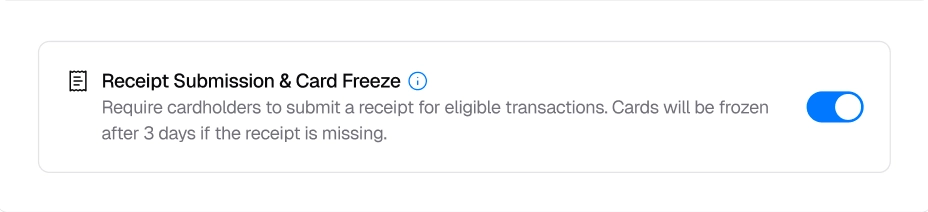
What Happens After You Turn It On
- Every new transaction on that card requires a receipt.
- If a receipt isn't uploaded within 3 days, the card freezes automatically.
- The cardholder gets reminders as the deadline nears, and is notified if the card locks. Admins get an email too.
Unfreezing a Card
There are two ways a card frozen due to an expense submission policy violation gets unfrozen:
- Admin unfreezes it manually — go to the card and turn Freeze card off. This restarts the 3-day window, so the card can freeze again if the receipt still isn't submitted.
- Cardholder submits the missing receipts — once every outstanding receipt on that card is uploaded, it unfreezes automatically.
Tips
- Turn it on while creating the card so it's active from the first transaction.
- Each card is configured and evaluated on its own — enabling it on one card doesn't affect any others.
- If a cardholder needs more time, an admin can manually unfreeze the card.
Important Notes
Note: This feature is only available on Travel & Expense cards — not on Fleet cards. It only applies to transactions made after the toggle is turned on for that card. Anything from before is never affected, even retroactively.
Support Information
Contact us at info@darbpay.com or call 0114516488 — Sunday–Thursday, 9:00 AM–5:00 PM (KSA Time).